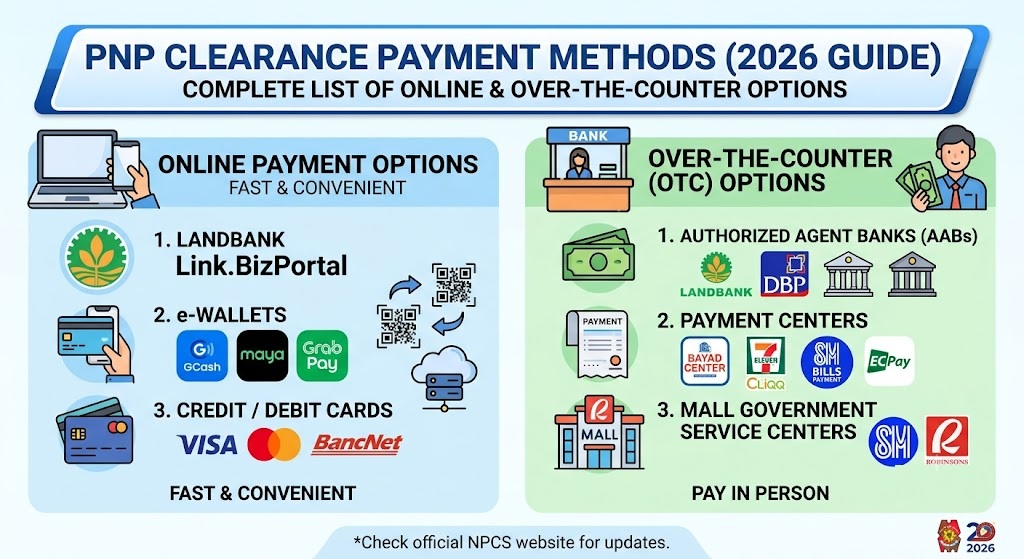
If you’re applying for a Philippine National Police (PNP) Clearance, one of the most important steps is paying the required clearance fee. Fortunately, the PNP clearance payment system supports multiple payment channels, allowing applicants to pay online through digital wallets, banking services, debit or credit cards, or in person through authorized payment centers.
This guide explains all available PNP clearance payment methods, how each payment option works, the expected fees, and common payment issues applicants may encounter during the process.
Whether you’re applying for employment, travel, business requirements, or government documentation, understanding the correct payment process helps avoid delays in your clearance application.
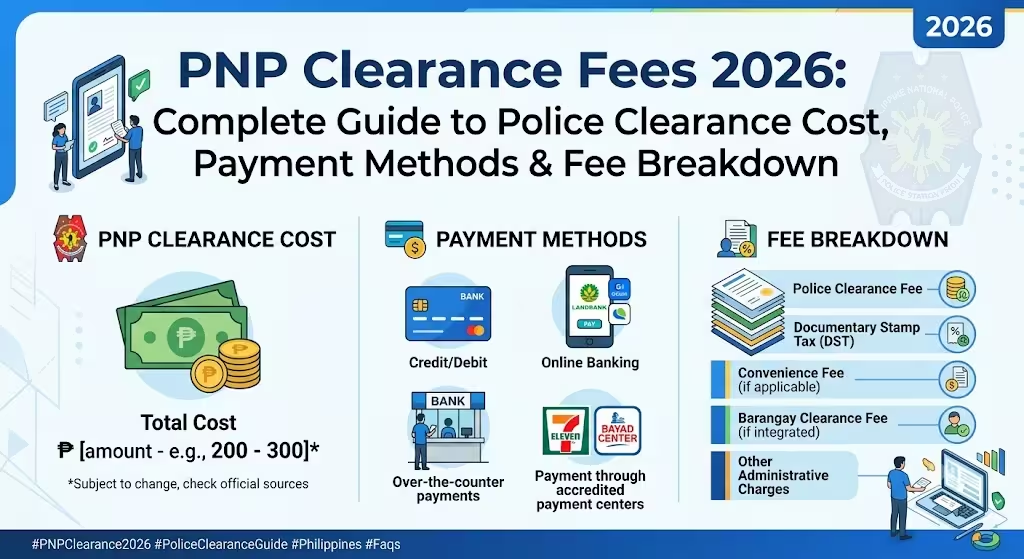
The Philippine National Police allows applicants to pay their clearance fees through several secure payment channels integrated into the official online appointment system.
The available payment methods include:
- GCash
- Maya
- LandBank ePayment Portal
- LandBank Account
- BancNet ATM/Debit Cards
- Visa Debit Cards
- MasterCard Credit or Debit Cards
- 7-Eleven CLiQQ
- Bayad Center
These options provide flexibility for applicants who prefer cashless transactions or over-the-counter payments.
PNP Clearance Payment Fee
The standard PNP Clearance fee is:
- PNP Clearance Fee: ₱150
- Convenience/Service Fee: May vary depending on the selected payment provider.
The final amount displayed on the payment page may be slightly higher because payment gateways typically charge a minimal processing fee.
Always verify the total amount before confirming your payment.
GCash Payment for PNP Clearance
GCash is one of the fastest and most commonly used payment methods for PNP Clearance.
How to Pay Using GCash
- Complete your PNP Clearance application.
- Proceed to the payment page.
- Select GCash as your payment option.
- Enter your registered GCash mobile number.
- Open the GCash app.
- Review the payment details.
- Enter your MPIN to authorize the payment.
- Wait for the payment confirmation.
Visit: PNP Clearance Login Guide
Why Choose GCash?
- Instant payment confirmation
- Available 24/7
- No need to visit a payment center
- Easy transaction history tracking
Pay PNP Clearance Using Maya
Maya is another convenient digital wallet accepted for PNP Clearance payments.
Payment Steps
- Select Maya during checkout.
- Log in to your Maya account.
- Confirm the payment amount.
- Authorize the transaction.
- Receive your payment confirmation.
Maya users typically receive confirmation within a few minutes after successful payment.
LandBank ePayment Portal
Applicants who maintain a LandBank account can conveniently pay through the official LandBank ePayment Portal.
How It Works
After selecting LandBank during checkout:
- Log in to your LandBank account.
- Verify the payment amount.
- Approve the transaction.
- Wait for the payment confirmation.
This option is suitable for applicants who regularly use LandBank’s online banking services.
Pay Using BancNet ATM or Debit Cards
Many local ATM and debit cards connected to the BancNet network are supported.
Supported Transactions
- ATM Cards
- Debit Cards
- BancNet-enabled accounts
Applicants simply enter their banking details on the secure payment gateway and authorize the payment using their bank’s authentication process.
Visa and MasterCard Payments
Applicants may also use internationally accepted debit or credit cards.
Supported cards include:
- Visa Debit
- Visa Credit
- MasterCard Debit
- MasterCard Credit
Before submitting payment, ensure your card is enabled for online transactions.
Related: PNP Clearance for First-Time Job Seekers
7-Eleven CLiQQ Payment
Applicants without online banking or digital wallets can pay in cash at participating 7-Eleven stores.
How to Pay at 7-Eleven
- Select 7-Eleven during checkout.
- Generate your payment reference number.
- Visit any participating 7-Eleven branch.
- Use the CLiQQ kiosk (where available) or provide the payment reference to the cashier.
- Pay the required amount.
- Keep your payment receipt until your application is completed.
This option is ideal for applicants who prefer paying with cash.
Bayad Center Payment
Bayad Center is another authorized over-the-counter payment channel.
Payment Process
- Choose Bayad Center as your payment option.
- Save your payment reference number.
- Visit a participating Bayad Center branch.
- Present your reference number.
- Pay the required amount.
- Keep the official receipt for your records.
Payment confirmation is usually reflected shortly after successful processing.
Which PNP Clearance Payment Method Is Fastest?
For most applicants, digital payments provide the quickest experience.
Generally, the fastest payment options are:
- GCash
- Maya
- LandBank ePayment
- Visa or MasterCard
- BancNet
These methods usually confirm payments within minutes, allowing applicants to continue with the next steps of their clearance application sooner.
Related – POA PNP Login and Registration Guide
Tips Before Paying Your PNP Clearance Fee
To avoid unnecessary delays:
- Double-check your personal information before making payment.
- Ensure your internet connection is stable.
- Keep your payment reference number.
- Save screenshots or digital receipts.
- Do not close the payment page until the transaction is completed.
- Verify that your digital wallet or bank account has sufficient funds.
These simple precautions can help prevent duplicate transactions or payment failures.
What Happens After Successful Payment?
After your payment is confirmed:
- Your appointment status is updated.
- Your payment record is linked to your application.
- You can proceed with your scheduled PNP Clearance appointment.
- Bring a valid government-issued ID and any required documents on your appointment date.
It is recommended to keep both printed and digital copies of your payment receipt until your clearance has been issued.
Common PNP Clearance Payment Problems
Payment Is Not Reflected
If your payment does not appear immediately:
- Wait a few minutes, as some payment gateways require processing time.
- Refresh your application status.
- Check your email or SMS for payment confirmation.
- Contact your payment provider if the amount has already been deducted.
Duplicate Payment
Avoid clicking the payment button multiple times if the page appears to be loading. Doing so may result in duplicate charges.
Invalid Reference Number
Always copy the payment reference carefully. An incorrect reference number may prevent your payment from being matched to your application.
Read more: CIRAS PNP Login Guide in Philippines
Frequently Asked Questions
Final Thoughts
The PNP Clearance payment system offers multiple secure and convenient payment methods to accommodate different applicant preferences. Whether you choose GCash, Maya, LandBank, BancNet, Visa, MasterCard, 7-Eleven, or Bayad Center, the process is designed to be straightforward and accessible.
Before making your payment, verify your application details, use the correct payment reference, and save your receipt for future reference. Choosing the payment method that best fits your needs can help ensure a smooth and hassle-free PNP Clearance application experience.