Getting a Philippine National Police (PNP) Clearance is an important step for employment, travel, business transactions, government applications, and many other legal purposes. However, receiving the document is only part of the process. Many employers, government agencies, and organizations also need to verify whether a PNP Clearance is genuine and valid.
If you’re looking for a complete guide to PNP Clearance verification, this article explains how the verification process works, who can verify a clearance, what information is required, common verification issues, and practical tips to ensure a smooth experience.
Whether you’re an applicant, employer, recruiter, or government office, you’ll find everything you need to know in this guide.
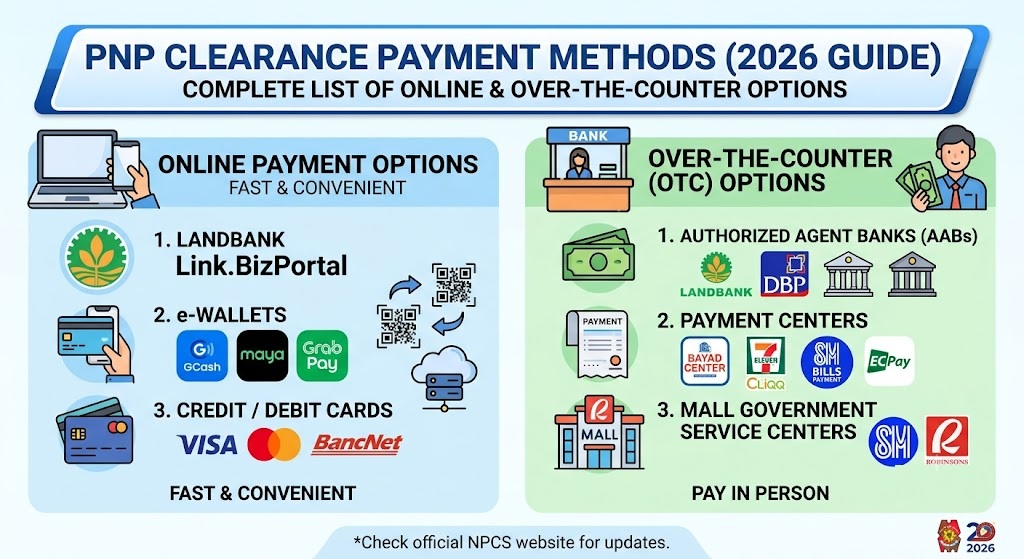
Related – PNP Clearance Payment Methods
What Is PNP Clearance Verification?
PNP Clearance verification is the process of confirming that a Philippine National Police Clearance is authentic, valid, and issued through the official PNP clearance system.
Quick Answer
To verify a PNP Clearance in the Philippines, use the official verification feature provided through the Philippine National Police clearance system. Enter the required verification details exactly as they appear on the clearance certificate to check its authenticity and validity.
Verification helps reduce fraud and ensures that the presented clearance is legitimate.
Why PNP Clearance Verification Matters
Verifying a police clearance protects both applicants and organizations from the risks associated with forged or altered documents.
Common situations where verification is required include:
- Employment applications
- Government hiring
- Overseas employment processing
- Business permit applications
- Licensing requirements
- Scholarship applications
- Volunteer programs
- Security-sensitive positions
Organizations often verify police clearances before making important decisions involving recruitment or legal compliance.
Visit: PNP Clearance Login Guide
Who Can Verify a PNP Clearance?
Several parties may need to verify a PNP Clearance, including:
Employers
Private companies frequently verify police clearances before onboarding new employees.
Government Agencies
Government offices may validate submitted documents as part of recruitment or public service requirements.
Recruitment Agencies
Local and overseas recruitment agencies commonly verify clearances during pre-employment screening.
Educational Institutions
Some schools and universities request verified police clearances for internships, research programs, or employment.
Individual Applicants
Applicants may also verify their own clearance to ensure all information is correct before submitting it to an employer or agency.
Information Needed for PNP Clearance Verification
The verification process typically requires the information printed on the official PNP Clearance.
Depending on the verification method, you may need:
- Reference or clearance number
- Applicant details
- Date of issuance
- Verification code or QR code (if available)
- Other identifying information shown on the clearance
Always enter the information exactly as printed to avoid verification errors.
Related: PNP Clearance for First-Time Job Seekers
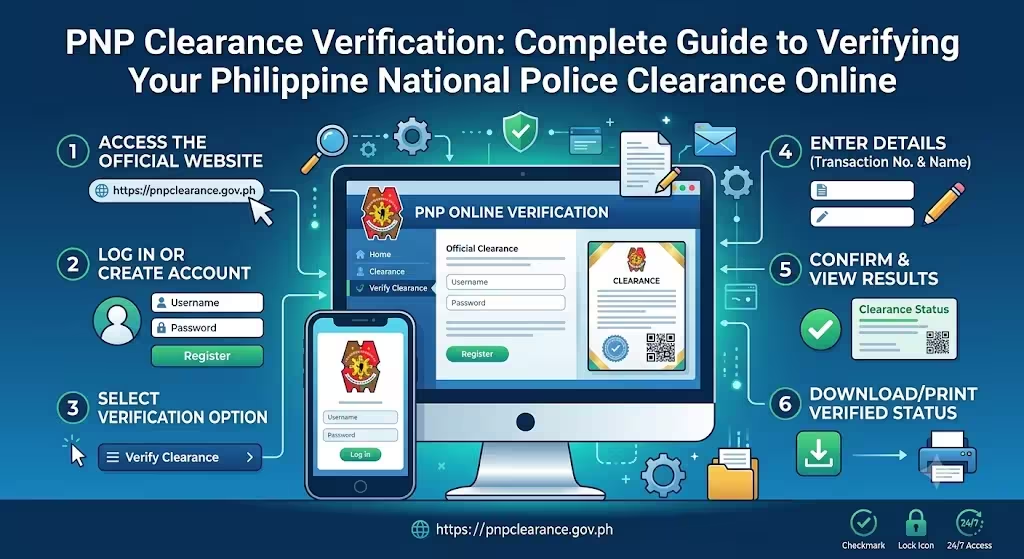
How to Verify a PNP Clearance Online
Verifying a Philippine National Police Clearance is generally a simple process.
Step 1: Visit the Official PNP Clearance Website
Access the official Philippine National Police Clearance portal using a secure internet connection.
Always use the official website to avoid scams and unofficial verification services.
Step 2: Open the Verification Section
Locate the verification feature available on the portal.
The system is designed to help confirm whether a clearance is valid.
Step 3: Enter the Required Details
Provide the requested verification information exactly as it appears on the clearance certificate.
Double-check every character before submitting.
Step 4: Submit the Verification Request
Once the required information has been entered, submit the request.
The system will process the verification.
Step 5: Review the Result
If the entered information matches the official records, the system will display the verification result.
If no record is found, review the information carefully and try again before contacting the appropriate PNP office.
Related – POA PNP Login and Registration Guide
Common Reasons Why Verification May Fail
Verification does not always fail because a clearance is invalid.
Common causes include:
Incorrect Reference Number
Even a single incorrect digit can prevent successful verification.
Typographical Errors
Mistakes in names or identification details may affect the search.
Recently Issued Clearance
Newly issued clearances may require time before appearing in online records.
Expired Clearance
Some organizations require a currently valid police clearance.
Technical Issues
Temporary maintenance or internet connectivity problems can interrupt verification.
How Employers Can Verify PNP Clearance Efficiently
Employers handling multiple applicants can improve their verification process by:
- Checking every submitted clearance individually.
- Confirming applicant information matches employment records.
- Using only official verification channels.
- Keeping verification records for compliance purposes.
- Avoiding reliance on screenshots or edited document copies.
These practices strengthen hiring integrity and reduce administrative risks.
Common Mistakes to Avoid During Verification
Many verification issues can be prevented by avoiding these mistakes:
- Using unofficial websites
- Entering incorrect reference numbers
- Uploading edited or low-quality document copies
- Verifying expired clearances without checking validity requirements
- Ignoring system maintenance announcements
- Sharing sensitive verification details with unauthorized parties
Taking a few extra minutes to review the information can save significant time later.
Is PNP Clearance Verification Safe?
Yes, provided you use the official Philippine National Police verification system.
To protect your information:
Use Secure Networks
Avoid verifying sensitive documents on public Wi-Fi whenever possible.
Protect Personal Information
Never share verification numbers or personal details with unknown individuals or unofficial websites.
Keep Copies Secure
Store digital and printed copies of your clearance safely for future use.
Tips for a Smooth Verification Experience
Follow these practical recommendations:
- Verify documents before submission deadlines.
- Keep your clearance clean and undamaged.
- Save digital copies for reference.
- Review every entered detail carefully.
- Use a reliable internet connection.
- Check that your clearance is still valid for its intended purpose.
These simple habits can help avoid unnecessary delays.
Frequently Asked Questions
How can I verify my PNP Clearance online?
Visit the official Philippine National Police Clearance portal and enter the required verification details exactly as printed on your clearance.
Can employers verify my PNP Clearance?
Yes. Many employers verify police clearances during pre-employment screening to confirm document authenticity.
What should I do if my clearance cannot be verified?
Double-check the entered information, ensure you’re using the official verification portal, and contact the issuing PNP office if the issue continues.
Is PNP Clearance verification free?
Verification availability and related services may vary. Always check the official PNP Clearance website for the latest procedures.
Does verification confirm that my clearance is genuine?
Yes. Verification is intended to confirm whether the submitted clearance matches official records.
Can I verify an expired PNP Clearance?
You may still be able to check its authenticity, but many organizations require a currently valid clearance for official transactions.
How long does verification take?
Online verification is generally completed within a few moments once the required information is entered correctly.
Best Practices Before Submitting Your PNP Clearance
Before providing your clearance to an employer or agency:
- Verify it using the official system.
- Ensure all printed information is accurate.
- Confirm it meets any validity requirements.
- Keep both digital and printed copies available.
- Protect your personal information throughout the process.
Following these steps can help prevent delays during recruitment, licensing, or government transactions.
Final Thoughts
PNP Clearance verification plays an important role in confirming the authenticity of one of the Philippines’ most commonly requested legal documents. Whether you’re applying for a job, processing government requirements, or reviewing applicant credentials, using the official verification process helps ensure accuracy, security, and compliance.
Always rely on official Philippine National Police resources, verify your information carefully, and keep your clearance updated whenever required.